



The Science of Comfort: Understanding
Chair Ergonomics


Sitting without lumbar support for 8+ hours a day can compress your spine and increase fatigue by over 40%.

| Mistake | Effect on Body | Fix |
|---|---|---|
| Slouching | Causes back pain | Use lumbar support |
| Sitting too low/high | Knee & hip strain | Adjust seat height |
| Forward head posture | Neck pain, fatigue | Keep monitor at eye level |
| Crossed legs | Poor circulation | Keep feet flat on the floor |
| Leaning on one side | Spinal misalignment | Adjust armrests properly |

| Posture Element | Ideal Position | How an Ergonomic Chair Helps |
|---|---|---|
| Head & Neck | Aligned with spine, no forward leaning | Adjustable headrest supports neck |
| Shoulders | Relaxed, not hunched | Armrests prevent shoulder strain |
| Lower Back (Lumbar) | Maintains natural inward curve | Lumbar support reduces back strain |
| Hips & Thighs | Knees at 90° angle, thighs parallel to floor | Adjustable seat height ensures proper alignment |
| Feet Position | Flat on the floor or footrest | Height adjustability prevents leg strain |
| Arm Placement | Elbows at 90° angle, wrists straight | Adjustable armrests support elbows |
| Reclining Support | Slight recline (100°–110°) for comfort | Synchro-tilt or knee-tilt allows movement |


One of the most important factors in choosing an ergonomic chair is adjustable lumbar support. Adjustable lumbar support helps maintain the natural curve of your lower spine while reducing strain during prolonged sitting. Since everyone’s body shape, height, and sitting posture are different, fixed lumbar support may not provide the right level of support for every user. An adjustable system allows you to position the support precisely where your lower back needs it. This can encourage better posture, improve comfort, and reduce pressure on the lumbar region during long working hours. Whether you work from home or spend hours at the office, personalized lumbar support helps your chair adapt to your body—not the other way around.

Seat Depth Adjustment lets you customize the seat length to match your body size and leg length. A properly adjusted seat supports your thighs without putting pressure behind your knees, while allowing you to sit comfortably against the backrest. Shorter users can reduce the depth for better reach and posture, while taller users can extend it for improved thigh support. This personalized fit helps distribute body weight more evenly, reduces pressure points, and promotes a more natural sitting posture. By adapting to different body types, seat depth adjustment delivers greater comfort, support, and ergonomic balance throughout long working hours.

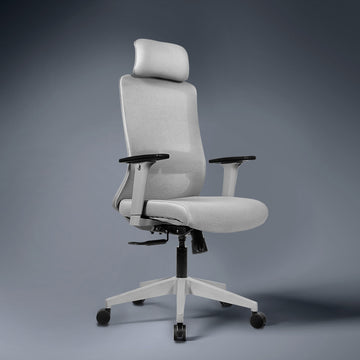
Dynamic Head Support provides personalized support for your head and neck, especially during prolonged sitting and reclined positions. Adjustable height and angle allow the headrest to align with your natural head and neck position, helping keep your head centered rather than leaning forward. This can promote a more neutral posture and reduce unnecessary strain on the neck and shoulders. When reclining, the headrest helps maintain comfortable head positioning while keeping your line of sight more naturally aligned. By adapting to different users and sitting positions, dynamic head support enhances comfort, posture, relaxation, and overall ergonomic support throughout the day.

Adaptive Arm Support allows the armrests to adjust to your body and preferred sitting position. Height, width, depth, and angle adjustments help position your arms comfortably while keeping your shoulders relaxed and supported. Properly positioned armrests can reduce pressure on the shoulders, neck, and upper back by providing support to your arms during work. They also help maintain a more natural alignment between your arms, wrists, and desk. Whether typing, reading, or reclining, adjustable armrests allow you to personalize your support for greater comfort and flexibility throughout the day.


Working Professionals
For all-day comfort and posture support, to prevent workplace chronic pains.
Gamers & Content Creators
Reduces fatigue during long sessions.
Students & Writers
Encourages proper sitting posture.
Executives , Managers & Business Owners
Enhances comfort and style in workspaces.
Anyone Experiencing Back Pain
Provides essential lumbar and posture support.
Checklist: Is Your Chair Ergonomic?
Does it support your lower back?


Sorry, the content of this store can't be seen by a younger audience. Come back when you're older.


